
What’s in my edit suite.
I had someone ask me the other day what exactly is in my edit suite. He’s looking for a new console and wondered what exactly I had in there and more importantly, why did I have those items in there.
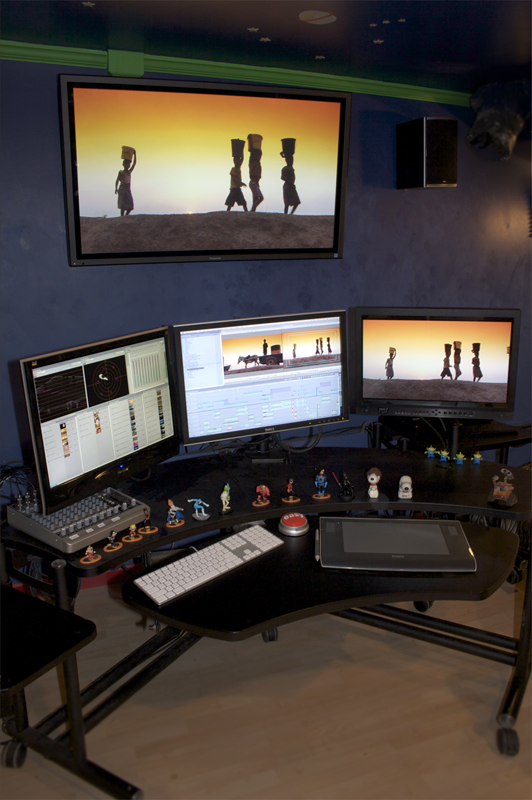
Ok, let’s start up on the wall. Panasonic 50″ Pro Plasma screen, 4 years old now and still looks great. I purchased it for a “wow” screen for the clients when we started working on Good Eats HD. We had a 20″ Sony CRT Multi-Format monitor for critical color decisions, but having the large screen up on the wall was great not only just for viewing the great picture but also helped in seeing all the noise inherrant in the early Varicam cameras. The early cameras especially had a lot of noise in the blue channels and having the big screen made it really easy to see and clean up. The plasma also has a lot of color, brightness and black controls making it pretty darn easy to eyeball the monitor to match the color critical monitor. It’s part of the Panasonic TH series and is an “8″ model. We also have a “9″, “10″ and “11″ model in our other rooms, all 42″ models. For price to performance, you just can’t beat these screens for the large client monitors.
On the far right side of the console is the Flanders Scientific 2450W color reference monitor. If you’ve read my blog or read my posts on the Creative Cow you know I absolutely LOVE these monitors. This monitor replaced my old Sony PVM series color reference monitors. Before purchasing these, I tested the Panasonic, Sony and TV Logic LCD monitors but the biggest problem I found with all of them were their color reproduction and especially the black reproduction. The blacks were milky. The TV Logic came the closest with an ND filter on the front of the monitor. But then Bram and Dan Desmet came in with their monitors and the rest is history. What really impresses me with the FSI’s is the viewing angle and their standard definition reproduction. LCD panels are notorious for small viewing angles and the FSI has the best viewing angles, particularly for editors and clients sitting side by side. LCDs usually are pretty lousy at presenting standard definition, especially interlaced material. Again, this is where FSI’s shine. We still do a fair amount of SD work here so it was critical to have a monitor equally at home in SD and HD. The price tag sealed the deal and we currently run four of their monitors in our shop.
The computer monitors, on the right is a Dell 24″ model and a Viewsonic 22″ model on the left. The Dell is a very good and very sharp monitor that we use for the primary interface monitor. The Viewsonic is just a Costco special that we use for bins and secondary items. For the secondary monitor I generally don’t spend as much, it’s just for holding elements and such. I have no idea why some people insist on having matched monitors because there is really no need. Nor is there a need for me to calibrate my computer monitors because we never, and I mean never, use those monitors to check color. All the color reference and image reference are solely based on the FSI monitors. We do not honestly care what the images look like on the computer monitors.
It’s hard to see in this image, but all three monitors are suspended off the editing console by swing arms. These are the Anthro Standard Swing Arms, capable of holding up to 18 lbs I believe. They’re somewhat expensive at around $225 each, but the ability to move the monitors around is very handy. I like to spend part of the day standing up so I’ll raise the computer monitors and tilt them upward to make it easier to see them. I can swing the FSI towards the client when necessary. We have the swing arms in two of the three suites and we’ll have them in all our new edit suites when we move.
All of this is sitting on an Anthro Fit Console unit with two additional shelves on either side. I LOVE these consoles and yes, they are somewhat expensive. Around $1,000 full price though they are as low as around $700 when on sale. Absolutely solid construction, you can put hundreds of pounds of weight on it. My favorite part is the overside keyboard shelf in the foreground that’s holding my keyboard and Wacom tablet comfortably. What’s awesome about it is the entire shelf goes up allowing me to work standing up for part of the day. Sitting all day everyday is a bit wearing, so I like to stand up from time to time. Some editors edit all day standing up. So I raise the keyboard up and as mentioned before, raise and tilt up the computer monitors making it very easy to work standing up. The entire thing sits on casters so I can easily move the console around as needed for extra folks in the room or for cleaning the floor. Can’t say enough good things about these consoles and we have one in every room of the shop.
The Wacom Intuos 3 tablet is the latest in a long line of tablets I’ve been using since 1996. When I first started out using it, it was because I spent a lot of time in Photoshop and it was so much easier to manipulate masks and graphics using the pen. Then I just started using it for editing and everything on the computer and I’ve never looked back. Especially with two computer monitors the tablet just makes it so much faster to work. A great side benefit: no carpal tunnel syndrome. Zilch, nada, no pain in my wrists ever.
On the left side of the console is the trusty Mackie 1202 mixing board that is a staple in so many edit suites. In my room we run multiple audio sources to the mixer both for listening to in the suite and for controlling the audio levels to our analog decks. Not seen in the picture are KRK Rokit 5 self powered audio monitors to the left and right. They’re mounted on self-made speaker platforms on the console shelves to the left and right of the editor. They’re mounted exactly at head level for optimum sound quality. Up on the wall you see a pair of home theater Polk Audio speakers that we use to simply turn the sound up loud to get a sense of what the projects will sound like in a theater or home theater system.
Rounding out the console is the Easy Button from Staples. We have fun with that after particularly good edits. And you can see just a small smattering of the toys that line the walls of Wally World. Those are The Incredibles on the console along with some classic Snoopys, Little Green Aliens and Wall-E.
Oh and if you’re wondering where the computer is, it’s in the machine room. We don’t have computers in any of our suites. You would not believe just how quiet the rooms are, it’s the first thing clients notice. No computer, no hard drives, no machine noise. My room is close enough that I have a pair of 35′ DVI cables and a USB extender to go through the wall to the computer. The other two edit suites use Gefen DVI / USB extender boxes that have a Sender unit at the computer and a Receiver unit at the monitors / keyboard with Cat5 cables strung between. The JungleLand suite has 65 foot Cat5 runs and the Rialto suite has 95 foot Cat5 runs so we can put the computers pretty darn far away from the suites.
Well there you go, a look at my edit suite and what we’re running in there. Oh I also have a Tangent Wave panel I bring in when I’m color grading projects, but it’s not necessary every day so I keep it out of the way for day to day operations. Hope this is helpful for some of you planning out your own edit suites!
Comments are closed.