Apple iPad, the luster wanes with no Flash.

Note: part of this entry appeared previously as a blog on the creativecow.net website. Let’s just say my opinions have been changed…..

Why did I purchase this?

I took delivery of the 16GB Wi-Fi Apple iPad in April. No, I did not wait in line, I took the leisurely deliver it to my front door method. I guess waiting in line could have been fun hanging with the crowd, but that’s ok. It got here. No, I’m not typing this blog on the iPad. This is still easier on the laptop.

I’m generally not an early adapter. When the iPhone first came out, I waited for the 2nd generation because I knew they would be faster and probably cheaper in a year or so. And I was still happy with my Motorola Razr phone.

So why jump on the very first iPad? Well, it looked like fun and it looked like a nice way to start and end each day. In the morning I have my coffee, breakfast and usually check out my emails, the local newspaper, CNN, MSNBC, the New York Daily News and the Creative Cow website. The iPad looked like it had a much better screen and viewing experience than the 15″ MacBook Pro I have been using. It’s also a lighter device.

On an airplane, unless I’m in first class / business class, I can’t open up my laptop comfortably to work or to view a movie. I played some games on the iPhone on my previous flight, but that is a pretty small screen. When I went to NAB in April we took the iPad and sure enough, it was perfect for watching episodes of Psych and some movies. Great screen, great viewing angle.

At home when watching television, we always have the laptop around to look up websites or look up information that is spurred by whatever it is we’re watching. I thought the iPad might be a little more handy than opening up the laptop each time we wanted to look up something. For the most part, this has been true. Again, it’s much lighter and easier to start up and look up something than using the laptop.

So I bought this thing for entertainment and to have something that’s a little smaller than a laptop. It’s a multi-media device that’s big enough to see the screen clearly yet small enough to go pretty much anywhere comfortably. But primarily, this unit was purchased to be used at my house for pleasure.

The Prohibition of Flash

Ok, so going into this purchase, I knew Steve Jobs prohibited Adobe’s Flash from the iPhone and iPad. I’ve had the phone for years now and don’t miss Flash on that unit at all. I don’t really surf the web at all with it. When I’m waiting around for something, hanging in an airport, whatever, I’ll go to the news apps to see what’s going on in the world. Check the Creative Cow’s mobile site to answer some questions. And definitely I check and correspond with my office and clients via email. But I don’t really surf the web with it where I would miss the Flash capabilities.

I think if you polled iPhone users, you would probably get a majority of users who feel the same way. Email communication is the primary reason why we have iPhone and the ability to use Twitter, Facebook, and News websites are a nice bonus.

Now the iPad is a different animal. It’s not a phone. You can’t make phone calls with it. It’s a multimedia device with an incredible 9.5″ screen designed to work primarily with the internet. The internet is full of websites that use Flash in one capacity or another. Hulu.com is one of the more recognizable names loaded with Flash videos.

Steve Jobs claims that Flash is the past and Adobe should move on to html5 support. Flash will slow down the iPad. Flash will kill the iPad battery faster. And there’s this line.... Adobe’s Flash products are 100% proprietary. They are only available from Adobe, and Adobe has sole authority as to their future enhancement, pricing, etc. Is Steve talking about Adobe or Apple? Steve, look in the mirror and say that same line.

Steve, I don’t see anyone selling Mac Clones. They used to, but it’s not allowed now. I don’t see any other computer manufacturer running Mac OS. I don’t see anyone else running the iPhone OS. I don’t see any competitive pricing for the Mac products (Mac Pro, Macbook Pro, etc…) no matter where they are sold. In other words, these products are 100% proprietary, they are only available from Apple and Apple has sole authority as to their future enhancement, pricing, etc…

But I digress… Flash is used for other purposes like forms, images, schematics and more. This past week my wife and I were researching pricing and itineraries for a potential cruise in 2011. Of course I pulled the iPad out as we were sitting outside on the deck. The iPad screen is very easy to see even in the full daylight. Well, one site after another would only partially work. We could get the basic information on the company, but no ship overviews, cabin layouts, itineraries and pricing would work. Just big empty white boxes. Using the Atomic Web Browser app, I checked the source of the pages and without fail, they all had .swf elements on the pages. So we pulled out my wife’s HP laptop to continue with our research. Again, her screen is much brighter than my MacBook Pro’s screen so it was a better choice to continue the research.

The iPad luster starts to wane.

So the lack of ability to simply research these sites that don’t have any Flash video on them, they use Flash for basic functionality, really made me think about Steve’s claims. Again, the iPad is an internet centric device. So if it’s an internet centric device then it should work with the entire internet, not just those parts that Steve Jobs feels we should be allowed to use. I paid over $600 for this device (price of the iPad + AppleCare + tax) and I’m being arbitrarily told what website I can and cannot use.

Look I’m not an Adobe fanboy by any means, just go read my blogs about Encore and you’ll see how much trouble Adobe has caused me. But Steve’s fight does not hurt Adobe whatsoever. He says it’s time for Adobe to stop looking back and start moving forward. Is he also going to tell all the thousands upon thousands of web sites using Flash elements they have to move forward too? Really? They have to spend thousands of hours to redesign their sites so they can operate on Apple’s proprietary iPad device or create an iPad App to be sold in Apple’s proprietary App Store after Apple employees approve it. Of course, they don’t have to approve it and there’s no arbitration or any other recourse to sell those apps for use on the iPhone and iPad.

Or, Apple could open up the iPad to Flash, one element being added to your device that opens up the entire internet. Oh and it still might not all work correctly. As Steve notes in his “thoughts” some Flash based sites rely on rollovers which a touch device doesn’t support. At least not at this time. So not everything is going to work, but certainly much much more of the web will work than what works now.

And finally I bought this iPad for use today. Not for what it will do tomorrow when (if) the entire internet changes over to all html5. I’m sure it’s going to happen, but just how quickly will that happen, especially when there are many millions more devices that CAN run Flash than can’t. Why knock yourself out to support just the “cool” factor devices when percentage wise, they are a very very small portion of mobile internet devices in use.

So here in our house, the luster of the iPad has really started to fade and fade quickly. It’s a cool device and the apps are nice, but we’re pulling out the laptops more and more these past few weeks because the iPad is simply useless to do much of the research we’re doing. You would think basic travel sites would work, but nope.

I originally purchased this base model of the iPad with the intention of upgrading next year. I figure it’ll get faster, larger hard drive and maybe a camera next year. And then I was going to give this one to my wife. She’s made it pretty clear she doesn’t really want it now. She finds her HP laptop much more productive than the iPad.

At this time, it looks like I’ll just use the iPad primarily for Twitter, Facebook and reading the news in the morning. When I fly, I’ll watch videos on the plane. Can’t really say that I would recommend the iPad anymore. When I bought it I loved it, especially the video playback. But now that I’ve had it for a while, I wish I would have just put the money towards a 13″ Macbook or a Windows based netbook. The “cool factor” would not have been there, but at least I would have the option to use the internet, the whole internet and nothing but the internet. I’ll chalk this up to a $600 mistake.

In the lexicon of Twitter, I’d have to give the current configuration of the iPad a #Fail. It’s still got a great screen, but honestly I could have spent my money better elsewhere. Oh, and before you all write to me, yeah I know all about the Cloud App that allows you to run Flash video on the iPhone / iPad. Um, not exactly an elegant solution nor does it address Flash functionality on websites.
We have permits for the new facility!

On Friday I was informed by the contractor that we have our building permits!! Woo hoo! That was the last piece of business required to get our bank loan. Yes, we had to get permits BEFORE we even own the land. That’s back assward if you ask me, but that’s how we had to do it to satisfy the bank.

So with any luck we will get a closing date set up this week and then we finally can start moving some dirt around. Woo hoo! Much more as we move forward.

Adobe After Effect CS5 has some issues on Mac

I received and installed the Adobe CS5 Production Package this week and today discovered that After Effects is pretty screwed up. Well, I take that back. The application seems to operate, just LAUNCHING it is screwed up.

See normally on a Mac, you just double click the application icon to launch an app. Not with After Effects CS5, at least not today. Searching the web I found a host of people who have not been able to get AE to launch on a Mac. Folks suggested boot in Safe Mode, then boot normally and other such stuff. Didn’t work here.

Then I found one guy who described how to launch AE using the Terminal. You know, that utility you really shouldn’t touch unless you know what you are doing? Well THAT worked and I have to leave the Terminal running the entire time. Nothing on Adobe’s website about a resolution but its pretty disappointing to have something as simple as launching the application not work correctly.

Oh and while discussing After Effects, remember CS5 is 64 bit so if you own plug Ins they most likely will not work. I found that out today when I thought I installed my Red Giant Mega Suite. All the apps when through the motion of installing, but then when I (finally) got Ae to launch there was nothing in there. They were all 32bit plugs so they don’t work. I’ve updated some of the Trapcode plugs but I’m not sure how many more I’ll update for now. Expensive to update the entire suite.

So keep in mind the cost of your plug ins when you upgrade.

Make time for fun!

Just a note to remind all of you out there, make time for fun every day. Take a few minutes every hour or so, step away from your desk, stand up, walk around. Take a quick break.

Then at least once a day, do something fun! I have a great dog in the office and we usually go out back once a day to throw the tennis ball. She loves it, I get outside and I have some fun.

We also have the Wii, XBox 360, Popcorn Machine, BluRay player, DVD Player, DirecTV and so on. And we have each other. Believe it or not we make each other laugh everyday. I’m lucky to have a great staff and we really enjoy working together.

Wherever you are, find time for fun. Remember, if you work in the creative arts, you’re getting paid to HAVE FUN! We create videos, website, graphics, movies, animations, etc…. and we are usually under a lot of pressure to get it done yesterday. But ultimately, we’re getting paid to have fun. So have a little fun in your day.

Wherever you are in this fine world, Smile! Give your face something to do! (courtesy of the most positive guy I know, my Dad.)

Foul Water, Fiery Serpent update

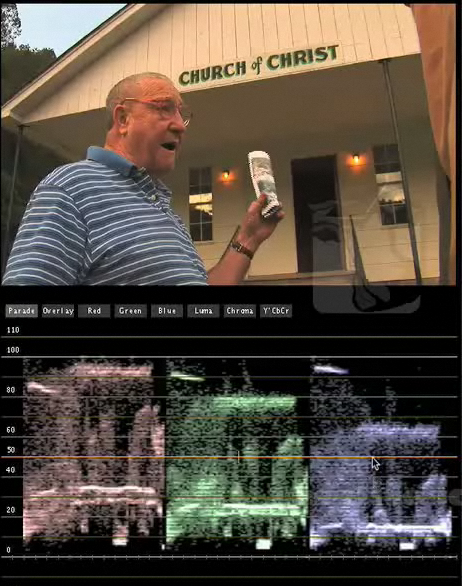
We’re getting closer and closer to finishing up the film. Ron Anderson did a tremendous job with the Color Grade, particularly some really REALLY difficult scenes. He just shows how far I still have to go as a Colorist. I’m pretty good, but man, nothing compares to 30 years of experience doing nothing but color. WOW! I will post some images when I’m allowed to show some before / after.

Sound design from Patrick Belden just simply ROCKS! If you watch “Good Eats” on the Food Network, you know his work, he’s been the sound designer for every episode of the series. He’s also one of the nicest guys you’ll ever meet with two super great dogs that hang out in the studio. Over the course of the edit, we used placeholder music to give Patrick an idea of what were looking for. He took those concepts and came up with what we think is a very unique soundtrack for an African based film. I don’t think I’ve ever heard anything quite like what he’s created for this type of film.

At this point we are really tweaking the graphics. Lots of a super fine tuning to make sure we’re all happy with the way they look and work with the final image.

Unexpectedly we also are making an edit for timing. This can be pretty tricky once the sound design is essentially completed. So the first thing I did was to call Patrick to describe what we were going to do and asked for his guidance to ensure we can do this in the most painless way possible. If I simply make the edits in the timeline and don’t keep track of what I’m doing, it can create a huge headache for Patrick on the sound design. I ended up removing about 35 seconds of the film and made a paper EDL for Patrick. Very specific timecodes of what was removed, at what time on the timeline, and exactly where it was moved to. Then I provide a quicktime movie that he can use for visual reference. It should all work out that we can pull all the audio up and not cause too much of an issue.

So we’re getting there. A long road since March of 2009 when we started Post on the feature and June 2006 when we delivered the short version of the story to The Carter Center. Definitely keep your eye on the film’s website as it will be rolling out to film festivals worldwide in the near future. I’ll update you guys as information becomes available!

www.foulwaterfieryserpent.com

New BCM facility update.

Happy to report that the architect drawings are done and we’ll be getting our building permits in order this week. Still waiting on a closing date from the bank but everything is coming together nicely.

Now for those of you out there thinking about building a new place or renovating a space, know that you do need to spend money on the architect / engineered drawings to get the loan. This is NOT cheap. Over $10k in our case The banks generally will not give you the loan unless they see a viable plan for the construction. In our case, we also have to get the building permits to show that the city will allow our structure to be built on the land we’re purchasing. This part seems silly to me since we’re on commercial land alongside similar buildings, but rules are rules and if we want the money we have to abide by them.

We’ve reformulated our plans now to upgrade our screening room to be a 5.1 surround mixing room in addition to a color enhancement room. I had always thought of doing some sound mixing in there, but thanks to the help of sound designer Patrick Belden, we’ve completely redesigned the layout of the room to make it even better suited for sound mixing. With the feature documentaries in the pipeline and the original series coming up, it just makes sense to really make this room better since we have the extra space. And the costs for properly setting up the room have dropped so much in the past few years it makes financial sense too.

So that’s the major new step we’ve made now in our plans to expand a bit beyond just visual post but to add sound mixing to the list of in house services.

We’ve also spent a lot of time researching lighting options and right now it looks like the majority of our lights will come from Ikea. Even looking at discount lighting websites, nothing comes close to the prices of Ikea and we are fortunate to have one right here in Atlanta.

For the kitchen, we’re sticking with the same unfinished Continental cabinetry we have in the current place and it’s just solid wood and incredibly cost effective. Even compared to the same style Ikea cabinets, we save over $1500. Just get a few gallons of paint and they’re done. The money we save on the cabinets can go towards nicer counters.

Well that’s pretty much it for now. More soon!

Your workflow MUST match the tool

This is a perfect example of someone who does not have the correct Final Cut Pro configuration or the proper workflow.

http://ace-filmeditors.blogspot.com/2010/05/end-of-final-cut-for-me.html

Notice he’s an ACE editor so this shows that even the professional editors don’t always get it right for whatever reason. My feeling is that his system is simply not configured properly for the huge projects he’s undertaking. You simply cannot have a system crashing 5 times a day, let alone 5 times a week and expect to get any work done.

It appears this person is an Avid editor and made the switch over to Final Cut Pro for these projects and tried to apply all his Avid workflows to FCP. Can’t do that. You need to adjust your workflow to match the tool.

As for the crashing, I can only assume this was a badly underpowered system or poorly configured. Currently we’re managing almost 400 hours of material on our systems for three documentaries. One documentary has been in Post 14 months. In addition we have three broadcast series going along with a myriad of other projects. Final Cut Pro is not crashing here. Maybe once a month, once every two months on one of our 5 workstations.

Unfortunately this editor got set up in a perfect storm. Trying to force a tool into a workflow he was familiar with, but that the tool is not optimized for. Poor system configuration and / or poor media management.

A shame because now he blames the tool instead of realizing that the tool works, it just has to be configured and used correctly. A lesson for all of us.

Color Grading is done on a proper monitor

Last week there was a thread in the Creativecow.net Apple Color forum asking about the Color Preview Window. You know that little video window that appears on the same screen as the scopes?

Anyway, this person was asking if we all noticed that the Preview window can show a different image than the Final Cut Pro Canvas Window. In his case, the Color Preview window was more red than the Canvas.

My response to this and all other queries about the Apple Color Preview window is as follows:

“So What?”

Seriously. There is absolutely no reason for anyone to even look at the Preview window in Color. In fact, Apple really should just remove it from the interface because it’s not necessary.

We have four primary workstations set up in our facility. We have a myriad of computer monitors from Apple, Dell, Samsung and ViewSonic. If you go into all four of those rooms and put the exact same image up on Apple Color it will look different on all four of the computer monitors. Why? Because they’re not set up exactly the same, they’re not the same manufacturer, they’re not the same model, the editor has adjusted the monitor to better suit their viewing needs, etc….

Now in that same thread on the Creative Cow we got a comment along the lines of “well why can’t Apple create two products that display the image the same?” First of all, Apple didn’t create Final Cut Pro or Color. FCP was the brainchild of Macromedia which Apple has seriously refined and improved and Color came from Silicon Color and was rebranded from its original Final Touch name. Second, FCP and Color DO display the image exactly the same. Through a video capture card to a properly calibrated broadcast or film monitor / projector.

See going back to that scenario with my four edit workstations, look at that same image on all four broadcast displays and the image will look exactly the same. That’s because our monitors are all identically calibrated Flanders Scientific broadcast monitors. All our systems are feeding the same image via matched AJA Kona 3 board. So it doesn’t matter which room you work in, the image looks the same.

In fact, our documentary, Foul Water, Fiery Serpent was color graded by Ron Anderson in his facility using a Flanders Scientific monitor, Apple Color, AJA Kona 3 and you know what, the film looked identical in our facility to his. Why? Same setup, same properly calibrated monitor. Two facilities, identical image. How many of you can say that when you go from place to place?

This is why so many of us who use Apple Color harp on people when they complain about the computer image. There should be no discussions about what the computer image looks like in comparison to the Final Cut Pro Canvas or Viewer or Quicktime or any other computer based video player. All that matters is what is on the external display, the properly calibrated external display.

So once and for all, repeat after me.

“The Apple Color Preview Window Does Not Matter. I will disregard the Apple Color Preview Window. I will only trust the properly calibrated external display.”

Thank you. I think we’ve made really good progress today. Set up your appointment for next week before you leave…..

Flanders Scientific calibrates your monitor for free!

Had a great visit from Bram and Johan yesterday to calibrate my FSI monitors and during lunch Bram explained to me a calibration policy I didn’t know about. All owners of FSI monitors can have their monitors calibrated free of charge by just shipping them back to Flanders. The owner pays shipping both ways, the monitor is usually turned back around that same day so you get it back in a hurry. They recommend FedEx and of course paying for insurance to cover the monitor in transit.

Yet another reason to love these guys. I don’t know of another company that will calibrate your monitors no charge for the life of the product. So how often should you do this? At least once per year.

Of course they also have a calibration kit you can rent if you have a lot of monitors but this is a nice option for us smaller guys who only have a monitor or two. We all take a vacation sometime right? That’s a perfect time to send your monitor back to FSI and you both arrive back at the office refreshed and ready to get back on with business!

Flanders scientific

Science Nation renews with BCM for 40 episodes

We’re pleased to announced that the series “Science Nation” produced by Kate Tobin Productions has signed on with BCM to post another 40 episodes. The series, produced for the National Science Foundation, has been with BCM since the creation and at the end of this new contract will have produced almost 100 episodes.

We’re proud to not only have helped create the look and start the series, but to continue the post production for another year. Editor Roger Mahr helms the series for BCM and along with Kate Tobin, contributing Producers include Marsha Walton, Ann Kellen, & Jon Baime with Miles O’Brien serving as an awesome host.

The series is produced in High Definition (both 720 and 1080) and delivered to multiple outlets in HD, SD and web based formats each week. BCM’s infrastructure allows us to deal with the multitude of camera formats that are used in the field to supply a very tight turnaround for each episode. In particular, the AJA Kona 3 video capture cards allows us to convert pretty much anything to conform all raw materials to a single format for ease of editing.

This is one of those projects that’s just so much fun to do and we really enjoy working with Kate’s team and all the incredible folks at the National Science Foundation. We definitely learn something new every week. Science is fun!