The Value of VARs. Find one and keep ‘em!

I see posts on the Creative Cow weekly and I receive a lot of requests to help folks configure an editing system to meet their needs. Honestly, all one needs to do is find a good, reputable Value Added Reseller. There’s two primary reasons for this.

One - This is what they do, they configure systems for people. So they know what people are buying, what is working and what is not working. Some things that look great on paper and should work, just don’t for whatever reason in the real world. The VARs know what has been installed that had to be replaced because it simply did not work as advertised.

Two – They have to stand behind and fix whatever problems you may have when you get your system. Almost no system arrives with zero issues. Many VARs will fully configure and test a system before it arrives at your facility to make sure it’s working properly. But even there, when it actually gets to your place and you start working on it, issues usually crop up. When this happens, all you want to do is make one call to your VAR and let them deal with getting everything in order. You have work to do, let someone else take care of all the phone calls and repairs.

Lastly, what if you ordered something that just isn’t what you thought it was going to be? It works fine and all, but it doesn’t quite suit your needs. A good VAR will work with the manufacturer to have that product returned for a full refund and offer you alternatives for a replacement product.

So a good VAR offers you the peace of mind that you are getting a good functional system with solid follow-up support. Build a relationship with one of these companies and you’re set for your career. That’s the value of a true VAR vs. the cheapest price on the internet.

I use and recommend the WH Platts company, based out of Charleston, SC and they have offices in several other states. They cover pretty much the entire East Coast. I deal directly with their Atlanta office and representative David Strupp. Been working with these guys almost 8 years now and pretty much everything, and I mean everything, that I order goes through these guys.
iMac i7 and i5 models reduced ethernet capacity

SEE UPDATES BELOW, I’ve updated this story three times since the original entry.

We took delivery of the brand spankin’ new 27″ i7 iMac last week and connected it immediately to our Final Share SAN in about 5 minutes for video editing. Quick tests showed the SAN was connected and working fine.

Then today I started really editing on it and I’m dropping frames every 10 to 30 seconds. Now it appears the ethernet controller that is in the new Mac cannot support the speeds necessary to edit video via the SAN. Our 2 year old iMacs can, but the brand spanking new, most powerful iMac cannot.

I’m at a loss as to how Apple can improve every aspect of this machine, including the absolutely stunning 27″ LED backlit display, but then cut back on something as simple as an Ethernet Controller that should be designed to work with today’s equipment running high speed internet instead of stepping backwards to the speed of older model PowerMac machines.

We’re working with a few folks to see if this can be addressed at all with a driver update or if it’s just all that the card can do. If this is all the speed we get, this machine is going back and we’ll move on with another machine. My original plan was to install up to 4 of these 27″ iMacs in our new facility, but that may have to change now if Apple is going to stay with these crippled controllers instead of giving us the speed we’re paying for.

I’ll update you guys as more information becomes available. To say I’m disappointed right now is an understatement. Wonder what I need to do to get on a beta test team because I seem to the person pushing all the systems further than any of their beta testers are. Everyone always tells me “you’re the first person to find this……”

—————————————

UPDATE #1 - 2/25/2010

I’ve been told the problem is limited to the 27″ i5 and i7 Quad Core iMacs.
The Core Duo machines appear to support full Jumbo Frames across Ethernet. We’re going to do definitive testing on both my i7 and a Core Duo machine this afternoon. Will update with more later.

——————————————

UPDATE #2 - 2/25/2010

We took the iMac to one of the local Apple Stores where the technician at the Genius Bar confirmed that the Broadcom 5764 Ethernet Controller in the i7 iMac 27″ does not support speeds over 1500. This same controller is in the i5 iMac 27″ machine too. From what he could gather, the Broadcom website is very vague as to whether the controller itself cannot support higher speeds or if it’s just a driver issue. I’ve been told by outside sources that the documentation on the 5764 states it does not support Jumbo Frames so that leads me to believe 1500 is the max.

Now the Intel Core Duo 2 machines, which is pretty much the rest of Apple’s lineup, all support Jumbo Frames. This includes the Core Duo 2 iMac 27″ machines. I’ve returned the i7 and have ordered the 3.33Ghz 27″ iMac.

I’m dumbfounded as to what happened with the design of the i7 and i5 machines. How was something as simple as an ethernet controller allowed to become a bottleneck on the flagship machine of a company? I don’t know, but be aware that if you plan to use this in a professional environment and will require true high speed ethernet data transfer, as of right now, the i5 and i7 iMacs will not support that.

Again, to say I’m disappointed with Apple right now is an understatement.

——————————————
UPDATE MARCH 4, 2010
Steve Modica from Small Tree reports over on the Creative Cow that he is starting to run some tests to see if there is an alternative way to run Ethernet Based SANs on the i7 and i5 models. I wish him well, but I’m not going to be a guinea pig!

Apple lays off 40 from FCP team. My take.

“Apple lays off 40 people from the FCP development staff right before NAB 2010.
Is it doomed?”

“Apple has laid off many people involved in the development in FCP. Will FCP languish now?”

If it’s getting close to NAB, it must be time for the new “Final Cut Pro is going away” rumor to start. By now, anyone who works with Apple’s Final Cut Pro software has probably seen the “tweet heard ’round the world” that Apple has apparently laid off 40 people from the Final Cut Pro development team. So of course we have to have multiple threads appear in the Creative Cow’s forums where we have the expected “Is Final Cut Pro doomed?,” “Why would Apple kill the product?” entries.

Why? I mean seriously. Why? 40 people were laid off, and as well noted by Shane Ross in multiple threads on the Cow, the bulk of these people were external contractors, not Apple employees in Cupertino. And suddenly the sky is falling? Entire COMPANIES have disappeared over the past year, some really HUGE companies have flat out disappeared off the map and we’re all up in arms that a product might disappear because 40 people were apparently let go from Apple?

Now I’m not taking their layoff lightly. 40 qualified people were apparently let go and that’s never a good thing when people lose their jobs, especially in this economy.

But in terms of the product line, Final Cut Pro and the rest of Studio, I don’t see why people get so uptight when the read something like this. Do you really honestly think Final Cut Pro, or the rest of Studio, would simply vanish overnight due to the loss of 40 people? Do you really honestly have any idea how many people are ON the Final Cut Pro and Pro Apps team?

There’s three reasons I can see for this layoff to have occurred:

1) Apple is trimming the fat on this department. Final Cut Studio is only $999 and accounts for a small portion of Apple sales compared to the consumer products like iPhone, iPods, iMacs and MacBooks. There comes a point where cutbacks are necessary in personnel and a decision was made to release these 40 people.

2) Apple has completed a full re-write of the software package to make it fully 64 bit compliant and have released the team members no longer necessary for the new build. This is standard procedure from what I have gathered at many software and gaming companies where a team is built up for a major software title and then that team is pared back down when the job is completed. This is much like any television production or film project quite honestly. In my own company we have anywhere from 2 to 12 people working in my offices depending on the jobs in the shop at any given time.

3) Apple is considering the sale of the entire Final Cut Studio package to a 3rd party and have released these people ahead of the sale. See I just don’t believe Final Cut Studio would simply disappear, not with over 1 million registered users around the world. I do believe at some point Apple would consider the sale of Studio to a third party vendor and in my opinion it could be a good thing, particularly if this was a software centric company and not a hardware centric company. If you are only making the money off the software, then you have to be constantly pushing the limits of it and constantly updating / upgrading it to meet the user base demands. If you are simply using the software as a carrot to sell your hardware, then you can allow the software to lag a little behind in development so long as you keep the machines improving at a fairly rapid rate.

If I were to take a guess on the reality, my guess would be Number 2. The fact that these were apparently external people who were let go leads me to believe these were primarily Quality Control and Testing type of people. The folks who hammer on the software to check that it functions as expected and to catch as many bugs as possible before the product is released. They might have also been folks who were advocates for new features and such.

Do I have anything to go on besides my own intuition? Nope, just a guess on my part based on what little information we have available to us. If we see a Final Cut Studio 4 or a Final Cut Pro 8 at NAB, then we’ll know that was the case. As usual with Apple, we’ll all know the truth when we know.

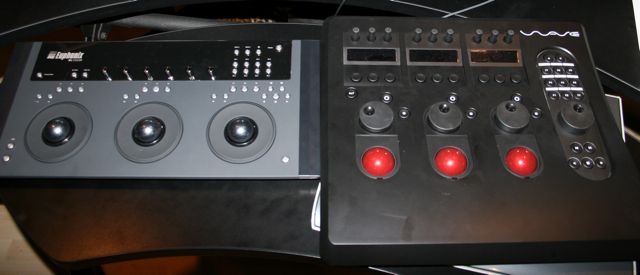
Euphonix MC Color, Tangent Wave side by side

Well I spent the weekend playing with the Euphonix MC Color for a Creative Cow review. Nice of those folks to send it along for testing. It is amazing how much easier Apple Color is to operate once you attach a control surface, whether it be the Cooper Eclipse, Tangent Wave or the MC Color.

For the testing I brought in amazing colorist Ron Anderson (30 years experience!) who also helped out with my Tangent Wave Review for the Creative Cow. He uses the JL Cooper Eclipse in his own studio and also operates daVinci and Scratch for CineFilm here in Atlanta.

For those of you wondering what the physical difference is between the MC Color and Tangent Wave, well here you go.

The MC Color is only 9 1/4″ from top to bottom while the Wave is about 16″ from top to bottom. So the Wave has extra area to rest your wrist which is pretty nice when doing a long session. They’re both about the same width and both fit very nicely onto just about any editing console. Here they’re sitting side by side on the keyboard shelf of the Anthro Fit Console in my JungleLand suite.

The primary physical differences are:

MC Color: 9 Soft Keys.
Wave: 9

MC Color: 6 Soft Knobs
Wave: 9

MC Color: 6 OLED Displays
Wave: 9

MC Color: Shuttle / Jog controlled by right Trackwheel.
Wave: Dedicated Shuttle / Jog

MC Color: Ring Trackwheels for Luma adjust.
Wave: Spin Trackwheels above for Luma Adjust.

MC Color: Ethernet connection / AC Power Supply
Wave: USB Connectivity and power.

Both are welcome additions to any Apple Color suite and the choice as to which one you want will be completely up to you. You can’t go wrong with either and NAB is approaching quickly which is a great place to get some hands on experience with them.

Personally, I’ve decided to stay with the Tangent Wave for the full time transport controls, the extra softknobs / displays and better use of the displays. The absolute PERFECT combination would be the MC Color trackwheels on the Tangent Wave.

Apple Cinema Displays, there is a difference

I’ve been in the camp that the Dell 24″ computer displays are every bit as good as the Apple displays so why spend the extra money to buy Apple? Well that was before I got up close and personal with the 27″ iMac and their new LED backlight displays. The display is so sharp and so crisp that any other monitor we have in the facility looks blurry.

I have found the 24″ LED Cinema Display to be equally as good and am now considering changing over all the computer displays in our shop to these despite their cost. Why? Eye strain. The sharper the monitor, the less strain on your eyes.

The beauty of video imagery is really pointless when it comes to a computer display. What really counts is the sharpness of the text. The sharper the text, you guessed, the less strain on your eyes. Think about it, when you’re editing with Final Cut Pro, creating in After Effects, painting in Photoshop, what are you really doing 90% of the time? Reading text in the interface. We have to read the name of the clips, read the parameters of the effect, select the proper tool, etc… Most of the time we are doing this by reading text and numbers.

So if you’re reading text and numbers 90% of the time, shouldn’t you get a monitor that’s well suited for 90% of the work your eyes will be doing? As someone who is now approaching the 2nd half of my life, I can feel eye strain coming on earlier each day. If I can give some sage advice to those of you coming along now, spend some extra money on a sharper computer display to keep your eyes in the best shape possible for the longest time possible.

I’m officially out of the “all computer displays are very similar so don’t waste money on the Apple displays” camp. If you can afford at least one of them for your primary monitor, definitely consider it.

Of course the whole Mini Display port throws a monkey wrench into my plans because all our computers are located in the Machine Room, up to 100′ away from the display. I have to figure out how I would get that Mini Display plug from the screen to my DVI Extender so it can feed the computer…. Another one of those things where you just want to say to Apple, “What were you thinking? Did you WANT to make life difficult for those of us actually wanting to BUY this monitor?”

But thanks to the ever benevolent and kind Bob Zelin, he’s found this handy dandy little adapter that will save the day. Monitor and adapter will be here this week so we’ll update you shortly!

Production “partner ship” proposal

Just had to share, this is pretty funny. I got this unsolicited email for a “partner ship” in media production…..

Hello, how are you? My name is —————.
Im from ——————-, i would like to know how can we work together?
I work with graphic design and digital print, and i have a lot of clients needs your service. So i would like to deal with you guys, as partnership if it’s possible.


For e.g: if i send the material, for animation and motion and you guys edit in the template that i choose and send me the the video to show the client and if he agree i will pay. for the HD and full project. I need make a proposal to them. before i negotiate with you.


It’s all very interesting until the line, send me the the video to show the client and if he agree i will pay.

So in other words, “I’ll send you the material, you do the work on spec, send me the final product and if the client likes it, I’ll pay you.” At this point it becomes very humorous. I would not recommend anybody work in this manner. To do a spec project is one thing, but to build a “partnership” around this kind of a concept would run anyone to ruin pretty darn quickly.

Just had to share…..


Tangent Wave Reviewed

Recently the folks at Tangent asked me to review their product for the Creative Cow website. As someone who only used a tablet and keyboard full time on Color, I was very excited to get my hands on this product. Well, ok, I WASN’T excited to get my hands on it, because, well it looked like a cheap piece of plastic.

Boy was I ever wrong about this. I liked it so much, we decided to keep it in the shop.

http://library.creativecow.net/articles/biscardi_walter/tangent_wave_rev.php

Euphonix MC Color Reviewed

I was recently invited by Euphonix to test drive their MC Color control surface with Apple’s Color software. All in all a very good product, though it needs some work. Full review on the Creative Cow website.

http://library.creativecow.net/articles/biscardi_walter/EuphonixMCColor.php

Welcome Back to the BCM Blog!

So if you were here the past few days, you’ll know that our website was attacked and unfortunately we lost the entire Blog. But no fear, we’re gonna start fresh with a clean slate and all new articles and tutorials.

So welcome back to the Biscardi Creative Media Blog and and our soon to be improved website!!!