 |
Walter Biscardi
Biscardi Creative Media
Buford, Georgia, USA
©2009 Walter Biscardi and Creativecow.net. All rights reserved. |
Article Focus:
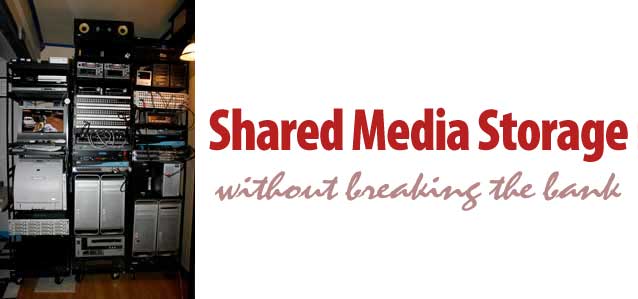
In this article Walter Biscardi, Jr. shows how he was able to add expandable, shared media storage in his facility for less than you would expect. And he was able to keep all of his current storage options in place, working right alongside the shared array.
|
Here's the Old Me.
"When I think of a shared storage system I immediately think of Fibre Channel. In order to get the data rates required for multiple systems to work from the same video file, you need a big, fat Fibre pipe. Gobs of data speed with plenty of overhead allowing any and all systems to work with the same file at the same time. Even with the prices dropping on the hard drives themselves, Fibre Channel solutions require a lot of money and in some cases, a degree in engineering to setup and maintain."
Does that sound familiar to any of you? Yep, thought so.
Here's the New Me.
"When I think of a shared storage system I immediately think of Ethernet. Yep, that thin little cable with the big telephone plug on the end of it. Here's the story of how we went from all local storage to shared storage for three edit systems and three iMacs AND still maintain all the original local storage we've built up over the past few years."
The Facility & the Need to Share
Biscardi Creative Media is a small post-production facility with multiple edit suites and a dog. And when I say small, I mean the entire facility is less than 1,000 square feet including the kitchen. Clients love the fact that it's cozy. I'm always reminded of the Genie in the movie Alladin, "All Infinite Power! Itty bitty living space."
In this little space we pack three high definition edit suites and a library management system. Most of our work is HD Broadcast, Independent film / documentary and Corporate image / trade show materials. BCM does all manner of Post including editing, color grading, graphic design, animation, & DVD/BluRay authoring so our systems have to be flexible in terms of what they do.
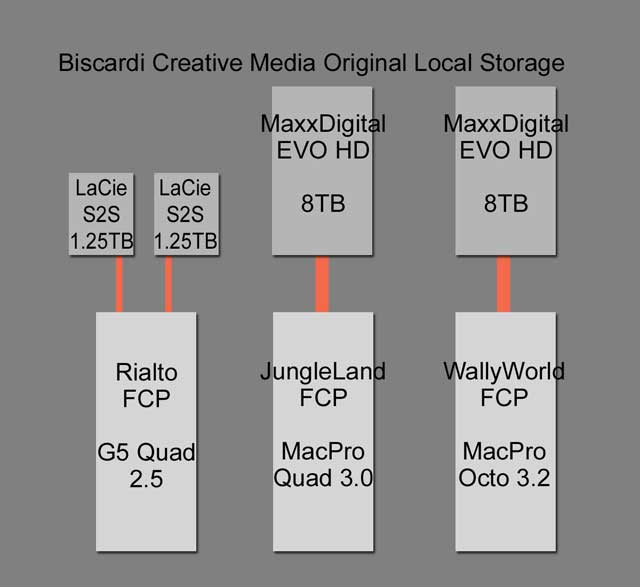
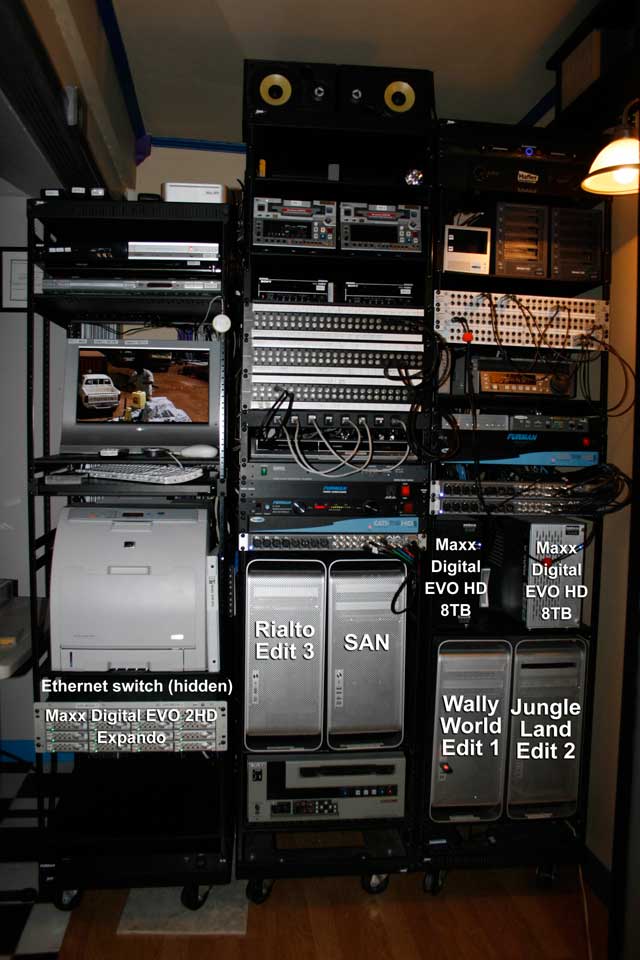
So here you can see our three FCP workstations, WallyWorld, JungleLand and Rialto. WallyWorld and JungleLand are the primary suites, each running a Maxx Digital EVO HD 8TB SAS/SATA array with the ATTO R380 Host Bus Adapter. These arrays put up about 500MB/s running in RAID 5. Rialto primarily uses two 1.25TB LaCie S2S eSATA arrays in RAID 0 and they run about 125 to 150MB/s. We have a few other eSATA drives and FW800 drives we use in there as well as needed.
So the systems are definitely capable of handling any job thrown at them, but flexibility between workstations is not all that efficient. All of our storage is set up as local to each suite. Yes, we have an Ethernet connection between the three computers themselves using the on-board Ethernet ports, but this still requires copying files from one system to other to be able to work with any speed at all.
Heading into 2009, we have four feature-length documentaries on our schedule and some potential episodic television series, in addition to our normal work. It was obvious to me that local storage was going to really limit our efficiency in Post. Basically one room would have to do everything from start to finish, or we would have to copy files from one system to another as necessary. Not the most efficient thing in the world, especially with a very limited schedule for each documentary.
But at the same time, I really like the fact that we have two 8TB arrays that can deliver plenty of speed (500MB/s in RAID 5) for cutting in Uncompressed HD and 2k when necessary. So the trick for me was to find a reasonably priced, large shared storage system to let the systems work together in DVCPro HD and ProRes HD on the documentaries, but still maintain that ultra high speed for use when necessary. It was that "reasonably priced" part that I could not find.
Enter Bob Zelin and Final Share from Maxx Digital.
The Idea
A few months ago I noticed a posting by engineer and technical guru Bob Zelin on the Creative Cow forums about a low-cost, high performance SAN that ran entirely on Ethernet. Like I said earlier, I was a firm believer that Fibre Channel was the only way to go with shared storage so this idea was very intriguing to me.
"I had read on Creative Cow than an editor working in California who put together an ethernet based shared storage system," notes Bob. "He was running 6 MAC FCP systems, and claimed he was doing ProRes 422 HQ on all six systems.
I had a client that was desperate to put in a shared storage system (David Nixon Productions), and he needed to buy another MAC and drive array for another FCP room, so we figured "what the hell," we would try it on his system. We ordered the hardware, and used this MAC Pro as the "server". The first time we saw HD media playing over standard ethernet cable, we almost passed out. When we got his second FCP system to play back the SAME HD Media at the same time, we started to jump up and down - we knew that this was a real solution."
That got my attention. Shared storage across multiple machines and not just regular desktop workstations. I could include pretty much ANY machine in our shop since we're just talking about plain old Ethernet. Not some special Fibre Channel which requires a desktop computer, cards, cables and limited distance. But did it actually work? I mean was it working in a real broadcast, deadline sensitive location where reliability is paramount? Bob had an answer for that too.
"The first system was at David Nixon Productions in Orlando, Florida. This installation happened in May or June 2008. One of their producers wanted to just screen clips on the shared media drives, and asked if we could use a laptop for this application. So we tried it. We ran a single ethernet cable to her office and all of a sudden she was able to see the HD footage on her laptop without any other hardware.
Two weeks later, I was asked by the producers of Nickelodeon's "My Family's Got Guts" to build two FCP editing systems for them, with shared storage. This was a perfect opportunity to try this process again - but this time, with more equipment. There were two editing rooms, so I put in TWO Maxx EVO shared disk drive arrays - one for each editor. This was all shared, but each editor would write to their own disk drive volume. The installation went well, and they too asked if they could hookup a laptop for screening the media.
Then they went beyond that to SIX MAC FCP systems running on this shared environment - the 2 original MAC Pro systems, 2 MAC Book Pros, and 2 iMACs, all sharing the same 2 Maxx EVO Disk drive volumes. The entire show was cut this way, with no dropped frames. All ProRes 422 HQ, all mastered back to a Sony HDW-M2000 VTR, and all approved by Nickelodeon. I knew that this was a revolutionary process."
Ok, so now I'm really intrigued and I have Bob and Maxx Digital spec out the system based on the following: 24TB Shared Storage connecting three Final Cut Pro workstations and 3 iMac computers. The iMacs were installed in each suite as a client computer and since we were going Ethernet, Bob suggested I should add them to the network to allow the clients to review footage right on those machines.
As the folks in Nickelodeon have already shown, the iMacs could be used not only as client viewing stations, but even for editing. This would be huge with the episodic television shows coming since I could have the edit assist work on the iMacs, even in the same room as the primary editor.
Unfortunately even a system this powerful would offer nothing for the dog, but Molly would understand. Many tennis balls would make up for her disappointment, but I digress…
The System
Here is a basic layout of the Final Share system as it was developed for my offices.
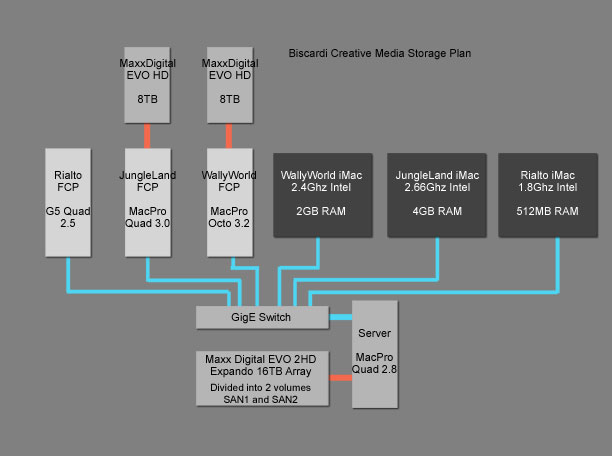
The system consists of a dedicated Mac Pro 2.8 Ghz Quad Core machine, a GigE switch, and a high speed MaxxDigital EVO 2HD Expando 16 Bay Chassis. You'll notice the Mac Pro is the base model. You do not need the super high speed Mac Pro to run this system, but it does have to be a dedicated machine. It cannot be an edit workstation. Oh and it does need a bunch of RAM, but more on that later.
You'll also notice that the local EVO HD units are still attached to the WallyWorld and JungleLand computers. Remember, we're just connecting the SAN via Ethernet so there's no cards to install, nothing to interfere with the operation of the local array. So we can operate those local arrays right alongside the SAN. This was a really attractive part of the deal for me since I've already invested quite a bit in those high speed arrays.
The real beauty in this system is the simplicity for the end user. Yes, there's a lot of stuff happening "under the hood" but for the end user this could not be more simple to operate.
Gone is the SAN Controller software. Gone are the individual Read / Write Access to each client, each volume. Gone is just about anything you've ever learned to fear from a shared storage network. The array is just there like any local drive you would turn on.
As Bob notes, "The system is so simple because of what Apple has created. Once the system is setup, there is no user interaction, unless he wants to add a new user, or new disk drive to the system. It just works. It is important to remember that the "shared" portion of this solution is not a development of Small Tree, or Maxx Digital - but APPLE Computer. But Maxx Digital and Small Tree make it fast enough to work with Hi Def video files."
Here's how simple it is to operate:
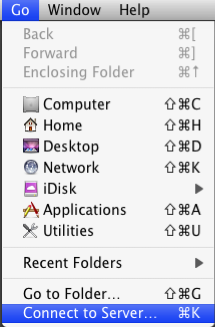
From the Mac Desktop. Go > Connect to Server
The IP address is already entered during the installation, so click Connect.
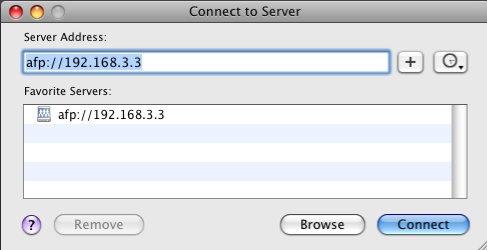
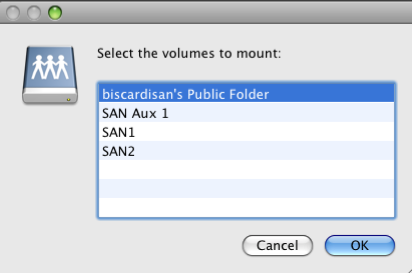
Select the Volume you want to mount and click Ok.
The SAN volume shows up on the desktop just like my local WallyMaxx2 array.
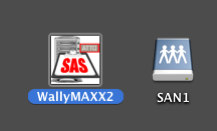
You can repeat the process to mount up other volumes if needed. That's it, start working and have fun. All the systems can connect to the same volumes and have simultaneous read / write access to everything.
We added a second, internal drive to the Server Mac Pro to facilitate our Job Tracking and Library Databases. As we're using Filemaker Pro on all our machines, we can now centralize our databases on the SAN so that was an added bonus.
The Installation
I'd like to tell you that the installation of this thing was a piece of cake. Rack mount some boxes, connect a few cables, set up the network on each machine, grab a latté and get to work. I'd like to tell you that because it really should have been that simple. With all the work behind the scenes, Final Share has been set up to literally be a plug and play system with some minor custom tweaking to be expected. After all, there's over 20 installations of this system running all over the United States so it's already been established.
But fate conspired to create a perfect storm of situations that bordered on high comedy at times and major drama at others.
We started off with 16 Seagate 7200.11 1.5TB hard drives that have been reported as having some sort of issues that cause them to freeze randomly. Those were replaced with Hitatchi enterprise level 1TB Drives. This dropped my storage from 24TB to 16TB, but that's OK, the performance of the arrays jumped dramatically with no more dropped frames.
Then we had a series of bad cards, almost inconceivable that we could have a run of bad cards both to feed the switch and to control the array. If I listed them all, nobody would believe it because it should not be possible, but as they say, truth is often stranger than fiction.
I did discover the somewhat unnerving sensation of watching my facility get remotely controlled by Steve Modica as he relentlessly pursued every issue by going through not only the Server computer but also all the FCP workstations. I also discovered by watching the screen that I would have been no help whatsoever to him. Have you ever just sat and watched an engineer enter code and run tests on a computer? It's scary and fascinating at the same time.
In the end, we got all the hardware issues resolved, some new drivers were created and in all honesty, I believe the Final Share system has been improved through all the testing that went on here. At the conclusion of our testing we performed these final tests. All of this was performed simultaneously.
Two edit systems capturing 720p / 59.94 Apple ProRes HQ material for approx. 25 minutes to SAN1.
At the same time, the Third edit system capturing 1080i / 29.97 Apple ProRes HQ material for approx. 20 minutes to SAN2.
At the same time, two iMacs playing 720 and 1080i ProRes HQ clips off SAN1.
At the same time, the third iMac* playing 720 ProRes HQ clips off SAN2. (See note below)
As each FCP system finished capturing, we set up 45 minute timelines on each FCP system and set those playing off in a loop. We then left everything for approx. 3 hours and all 6 machines were still playing upon our return.
So all 6 systems writing and reading from both volumes simultaneously for over 4 hours running both 720 and 1080i ProRes HQ material. In addition we could continue to capture / edit from our local EVO HD's on both primary edit systems. That's exactly what I was looking for and the system is now in service in our facility.
*The one hitch we did discover is that my older 1.8Ghz iMac simply will not work with SAN media playback due to the 512MB of RAM. You want at least 2GB of RAM in a machine (more if possible) for smooth playback off the SAN. For testing purposes we took that iMac offline and used another 2.4Ghz iMac with 2GB RAM from our library workstation as the third iMac in the network. This machine worked flawlessly in testing.
The Formats
Ok, so we're running on Ethernet so obviously this system is not a complete replacement for Fibre Channel. If you are in need of Uncompressed HD and 2K playback, this system is NOT for you. You will need the bandwidth and speed of Fibre Channel, there's just no way around that. Connecting iMacs to a Fibre Channel based shared system is entirely possible as well.
If you are working primarily in Uncompressed / Compressed SD and Compressed HD formats like HDV, DVCPro HD and Apple's ProRes, then Final Share is certainly a contender for your workflow and your wallet.
The top speed of for each system connected should be about 100MB/s with the expected speeds to come in around 80MB/s. During an AJA Video Systems Sweep test (which tests with a variety of file sizes in one test) we topped out at 111MB/s Read and 94MB/s Write though you can see the average Write is about 82MB/s. This was testing from the WallyWorld MacPro Octo Core machine.
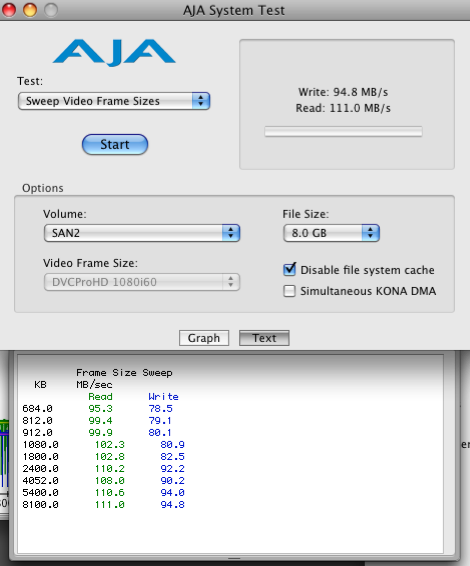
The speeds easily support Uncompressed SD and Apple's ProRes HQ codec in high definition. In our testing we found that the following are all supported on the SAN:
DV, DVCAM, DVCPro 50, Uncompressed 8bit and 10bit SD, DVCPro HD and Apple ProRes HQ SD and HD. We never work in native HDV so I didn't test that format, but obviously the system will support that workflow as well.
So this system is not for every single production need out there, but for a vast majority of producers and post production houses, this system can fill a great void. That of a high speed, reasonably priced SAN for small and large post houses alike.
Pricing, Expansion and the Nitty Gritty details
As configured in my shop to work with 6 workstations, this Final Share system runs about $21,000. This includes the Mac Pro with 16GB RAM, Ethernet and Host Bus Adapter Cards, Ethernet Switch, Maxx Digital Evo 2HD Expando 16 Bay Array, cabling and system setup.
An 8TB Final Share system would run you about $11,000 with the computer.
Now if you own a Mac Pro that's not doing anything at the moment, or ready to be replaced, you could save yourself some money by putting that machine to work as the Server. You'll need to check with the guys at Maxx Digital to see if it will work.
For comparison, I priced a Fibre Channel System with 18TB to be connected to four FCP Workstations and the price is over $50,000. This does NOT include connectivity to the iMacs. As I stated earlier, it's entirely possible to connect iMacs to Fibre Channel storage, it will just be additional cost. Again, applications where you need Uncompressed and/or 2K throughput, you MUST have Fibre Channel. The Final Share solution will not work for you.
Now you probably noticed I keep saying "Expando Chassis." This is a new breed of high speed SAS/SATA chassis that can literally be daisy chained just like you would daisy chain firewire drives. The difference is, these maintain the same 500MB/s+ speeds as you hang more chassis on the chain. So if I should need more storage in the future, I simply purchase another Expando chassis, connect it to the first, Initialize it and start editing about 10 minutes after I took it out of the box. I can hang up to 128 drives off a single computer and then share that with my entire network. This truly is a brave new world!
Now for the nitty gritty details, here are the configurations of the computers that are being used on this system as of the time of this article.
SAN Computer:
- Mac Pro 2.8 Ghz Quad-Core Intel Xeon
- 16GB RAM
- Mac OS 10.5.6
WallyWorld Edit 1:
- Mac Pro 2 x 3.2 Ghz Quad-Core Intel Xeon
- 10GB RAM
- Mac OS 10.5.6
- Final Cut Studio 2
- AJA Kona 3
- 8TB Maxx Digital
WallyWorld iMac:
- 2.4 Ghz Intel Core Duo (20" model)
- 2GB RAM
- Mac OS 10.5.6
JungleLand Edit 2:
- Mac Pro 2 x 3.0 Ghz Dual-Core Intel Xeon
- 8GB RAM
- Mac OS 10.5.6
- Final Cut Studio 2
- AJA Kona 3
JungleLand iMac:
- 2.66 Ghz Intel Core Duo (20" model)
- 4GB RAM
- Mac OS 10.5.6
Rialto Edit 3:
- PowerPC G5 4 x 2.5 Ghz (Quad 2.5)
- 4.5GB RAM
- Mac OS 10.5.6
- Final Cut Studio 2
- AJA Kona 3
Library iMac:
- 2.4 Ghz Intel Core Duo (20" model)
- 2GB RAM
- Mac OS 10.5.6
Walter Biscardi, Jr. is a 19 year veteran of broadcast and corporate video production who owns Biscardi Creative Media in the Atlanta, Georgia area. Walter counts multiple Emmys, Tellys and Aurora Awards among his many credits and awards. You can find Walter in the Apple Final Cut Pro, AJA Kona, Apple Motion, Apple Color and the Business & Marketing forums among others.
 |
"Stop Staring and Start Grading with Apple Color," the Creative COW Master Series DVD hosted by Walter Biscardi is now shipping, for only $49.95.
"This is one of the best training DVD's I've seen, and well worth the
price. I am now confident and ready to jump into Color with both hands."
--Gary Morris McBeath, SaltAire Cinema Productions
|